
Create Hide-my-email aliases in Proton Mail
- Lettura
- 2 minuti
- Categoria
- Addresses and identities
With Proton Pass and Proton Mail, you can create throwaway email addresses that forward incoming messages to your personal mailbox.
Hide-my-email aliases let you receive emails from websites without them knowing your primary email address. This makes it easier to protect your online identity, filter (or unsubscribe from) spam emails, and prevent your real details from being exposed in a data breach.
- Learn more about Hide-my-email-aliases
- Learn how to create additional (permanent) email addresses in Proton Mail
In this article
Create a Hide-my-email alias in Proton Mail
Note: If you use the Proton Pass extra password feature, you’ll need to create your aliases in the Proton Pass app.
- Sign in to mail.proton.me(nuova finestra). Select the Security center (shield icon) from the right side panel.
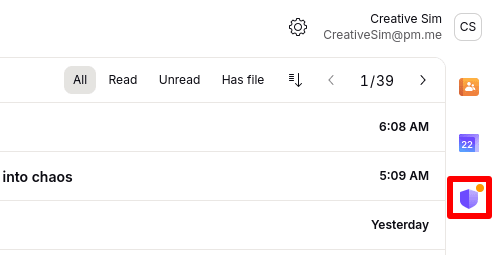
2. Go to Hide-my-email aliases and click New alias.

3. An alias address will be generated for you. You can optionally add a Title and a Note.
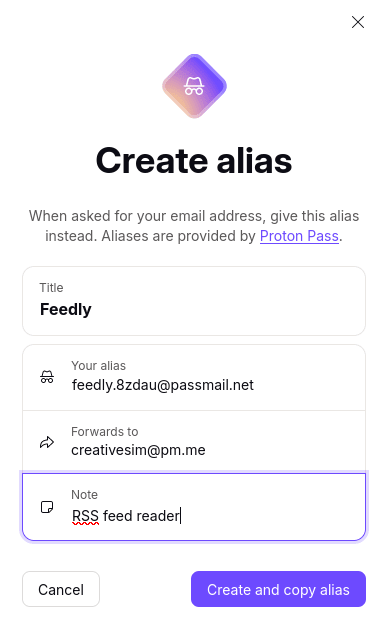
4. Click Create and copy alias to save your alias. This will also copy your alias address to your clipboard.
View, manage, and customize existing aliases
View recent aliases
Go to the Proton Mail Security center to view the last three aliases you created.
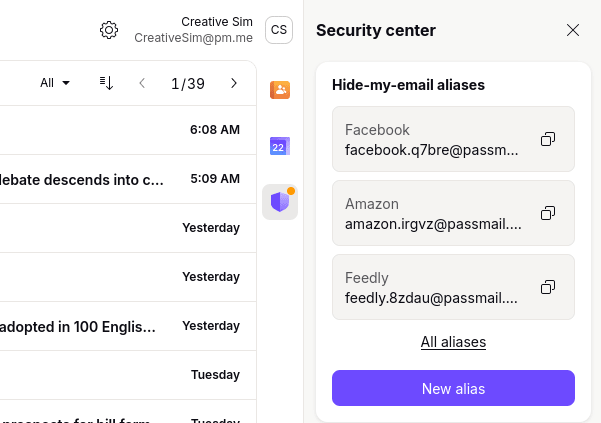
- Click the Copy icon to copy an alias to your clipboard.
- Click All aliases to view all aliases in the Proton Pass web app(nuova finestra).
Manage and customize aliases
- View all aliases
- Edit alias details
- Disable or delete an alias
- Create new aliases with more customization options
- Create new aliases without leaving the website or app you’re signing up to
Proton Pass is Proton’s secure password manager. All Proton Mail plans include the free version of Proton Pass, so you don’t have to pay to manage your aliases.
You don’t need to create a new account either. Just sign in with your existing Proton username and password.
Learn more about creating and managing aliases in Proton Pass